Feedback and Interaction
Interaction and feedback are crucial parts of web design.
Feedback provides users with information about the actions they take, while interaction engages users and makes the website feel responsive.
Feedback is the act of letting a user know the results of their actions, for example changing the colour of a button clicked or an error message being displayed, feedback allows the user to know that there has been a result of their action the website.
Interaction on the other hand allows the user to feel more interactive with the website, this is things like an animation being displayed when something is pressed or hover overed. This helps to keep the user engaged on the website and not get too bored.
What is the purpose of feedback and interaction?
Engagement- By having items that interact with the user it allows the user to stay engaged with the site, and stay on the site for longer.
Confidence- When a user get feedback from the website, displaying that their action has been completed or acted on, they take more confidence in the site and trust the site and the process happening.
Types of Interaction and feedback
There are many different types of interactions and feedbacks that can be displayed to a user on a website to help them stay engaged and focused on the site.
Visual feedback- Visual feedback includes buttons changing colour when pressed, a hyperlink changing colour when it has been viewed, and animations on screen to confirm an action has been carried out on the site.
Haptic Feedback- Haptic feedback is used more frequently on mobile sites, it includes using vibrations from the device to confirm an action has taken place
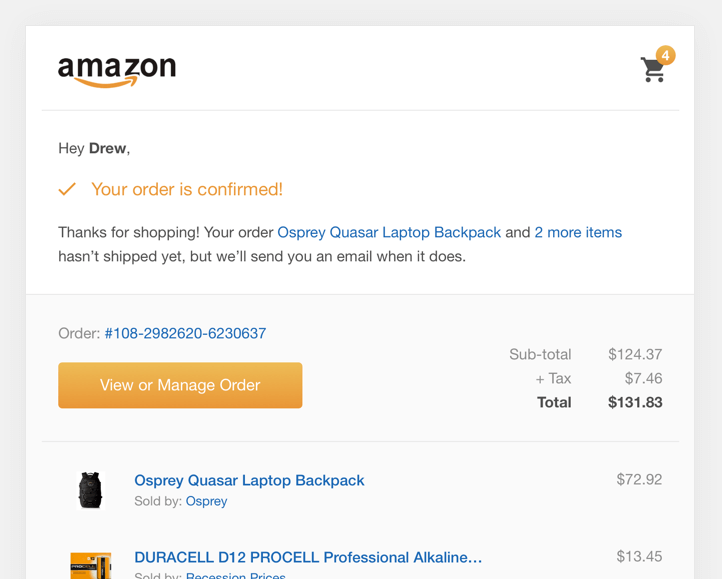
For example Amazon give the customer visual feedback that their order has been placed and is ready for dispatch.
This is a great example of visual feedback as it informs the user exactly what has happened and what is going to happen next.
Mistakes in feedback and interaction
Delayed response- If the response to a feedback loop is delayed it can lead the user to feel confused and lose trust for the site as they may have moved on from the action and wonder why they are getting a visual, audio or haptic feedback later then intended.
Also If a button takes a few seconds to respond, users may click multiple times, leading to duplicate actions or errors. Quick, responsive feedback keeps the user experience smooth.
Overusing animations- Overusing animations for interaction and feedback can cause the user to become annoyed and leave the site, the excessive number of animations can also cause the site to slow down. It’s best to use subtle, purposeful animations that enhance rather than distract from the content.
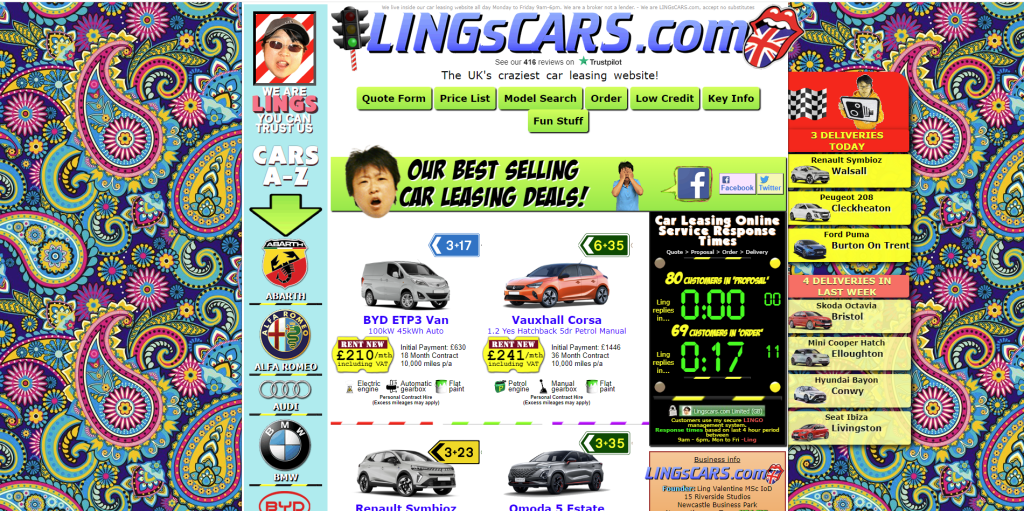
For example this website below has overusing animations which is very distracting and annoying to the user.
Feedback and interaction are crucial parts of a websites design as they allow the user to feel confident in their actions on the website. By creating a website that uses feedback and interaction properly it will allow the user to enjoy their experience on the site.
